
LinkedIn Video Specs 2026 — What to Brief Your Production Company
Updated: Sep 2

If you're commissioning LinkedIn video for the first time — or briefing a new production company — understanding the platform's technical requirements saves time, budget, and the frustration of receiving a finished film that doesn't upload correctly or looks wrong in the feed.
This isn't a post for people who want to film LinkedIn videos on their phones. It's for marketing directors, comms leads, and brand managers who are about to brief a professional LinkedIn video production company and want to know what to ask for.
Here are the LinkedIn video specs that matter in 2026, and what a good production company should be doing about each one without you having to ask.
The LinkedIn Video Specs That Actually Matter
LinkedIn publishes a full technical specification for video uploads. Most of it is irrelevant in practice — the limits are wide enough that any professionally shot and edited film will fall comfortably within them. What matters is the handful of decisions that affect how your content looks and performs in the feed.
Spec | LinkedIn Requirement (2026) | What a Good Production Company Does |
File format | MP4 or MOV | Delivers MP4 (H.264) — universally compatible across devices and browsers |
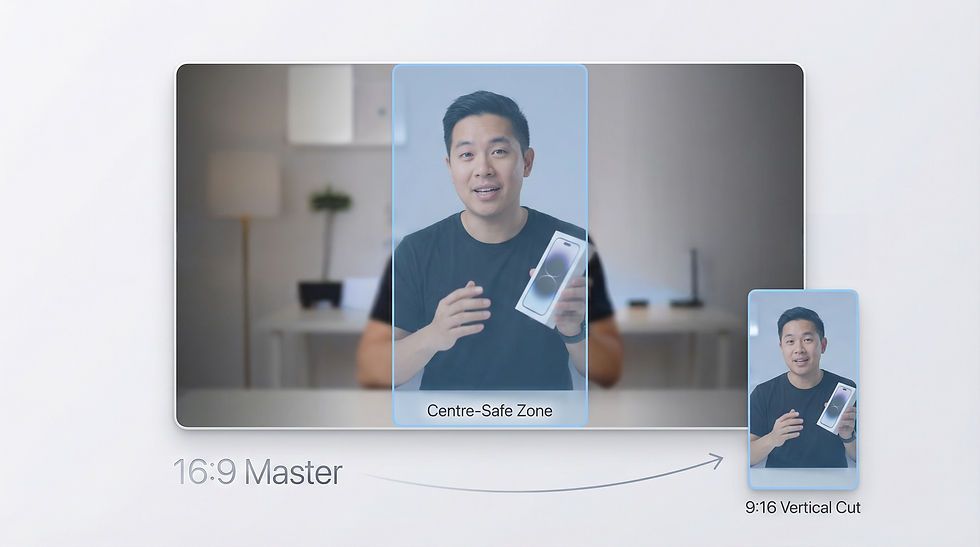
Aspect ratio | 1:1 square 16:9 landscape 9:16 vertical | Shoots once, delivers all three — you shouldn't pay for three separate shoots |
Resolution | 256×144 minimum 4096×2304 maximum | Films at 4K minimum so all crop formats hold quality |
File size | Up to 5GB | Typically 500MB–2GB for a two-minute film — well within limits |
Duration | 3 seconds – 10 minutes | Advises on 60–90 seconds for organic posts — the engagement sweet spot |
Frame rate | 10–60fps | 25fps for broadcast standard; 50fps if slow-motion is needed |
Audio | AAC or MP3, stereo | Mixes to –14 LUFS — the platform's loudness target for consistent playback |
Captions | SRT file upload supported | Supplies an SRT caption file with every delivery as standard |
LinkedIn is rarely the only platform in the plan. If you're briefing content for Instagram, TikTok or YouTube from the same shoot, the formats change — we've covered the full picture in our social media video specs guide.
Aspect Ratio — the Decision That Affects Everything Else
Aspect ratio is where most LinkedIn video briefs go wrong. The three formats LinkedIn supports — square (1:1), landscape (16:9), and vertical (9:16) — perform differently depending on the content type and how your audience is viewing the feed.
Square (1:1) is the most consistent performer for interview and talking-head content. It takes up more screen space than landscape on both desktop and mobile, and it doesn't require the viewer to tilt their phone.
Landscape (16:9) suits branded films, event highlights, and content that benefits from a cinematic feel. It's the natural output of most professional cameras and works well for more produced pieces.
Vertical (9:16) is increasingly used for mobile-first posts and content designed to feel immediate rather than produced. It's the format of choice if you're posting short clips from events or behind-the-scenes content.
A professional production company should shoot in a way that allows all three formats to be delivered from a single session. If you're being quoted for three separate shoots to get three formats, something has gone wrong with the brief.
Duration — What LinkedIn's Limit Doesn't Tell You
LinkedIn allows videos up to 10 minutes long. That ceiling is almost irrelevant — the more useful question is what length actually works for your audience.
For organic B2B content, 60 to 90 seconds is consistently the most effective duration. It's long enough to make a substantive point and short enough to hold attention in a professional feed where most people are scrolling between meetings. For a thought leadership interview with a genuinely compelling speaker, up to two minutes can work. Beyond that, you're making content for people who are already interested in your firm, not people you're trying to reach for the first time.
When briefing a production company, specify the target duration upfront. A well-structured shoot produces content that hits the right length naturally — you shouldn't be editing a 10-minute interview down to 90 seconds in post and wondering why it doesn't feel right.
Audio — the Spec Most Briefs Don't Mention
LinkedIn recommends AAC or MP3 audio in stereo. The more important standard is loudness normalisation — LinkedIn, like most platforms, normalises audio to approximately –14 LUFS (Loudness Units Full Scale). If your film is mixed too hot or too quiet, it will sound wrong when it autoplays in the feed.
A professional post-production process should include loudness normalisation as standard. If you're asking whether it's included, that's a reasonable question. If a production company doesn't know what –14 LUFS means, that's a useful thing to find out before you commission them.
Captions — Not Optional in 2026
LinkedIn supports SRT caption file uploads, and captions have become effectively non-negotiable for B2B video content. A significant proportion of LinkedIn is browsed on mute — in offices, on public transport, in between calls. A film without captions loses that audience entirely.
Every LinkedIn video delivery should include an SRT caption file. This is a separate file that contains the transcript of the spoken content, timed to the video, that LinkedIn uses to display subtitles. It takes about 20 minutes to produce accurately and it meaningfully increases the reach of every film you publish.
If a production company isn't including SRT files in their standard delivery, ask why.
What to Include in Your Brief
When you brief a LinkedIn video production company, the specs above should be covered by the brief itself rather than left to chance. Here's a simple checklist of what to specify:
Confirm you need MP4 delivery (H.264 codec)
Request all three aspect ratios — square, landscape, and vertical — from a single shoot
Specify target duration: 60–90 seconds for most content
Ask for audio mixed to –14 LUFS
Confirm SRT caption file is included in the delivery package
Ask what resolution the footage will be shot at (4K minimum is the right answer)
A good production company will have already planned for all of these. A brief that specifies them gives you a clear basis for comparing quotes and holding the production to account on delivery.
If you're looking for a production company that handles all of this as standard — Shootlab produces LinkedIn video for professional services firms and specialist B2B organisations. Multi-camera executive interview films, thought leadership series, and branded content, delivered in every format LinkedIn needs. You can see how this works in practice in our LinkedIn video production project for Alvine Capital in Mayfair, or find out more about our LinkedIn video production service.


Adjusting complex cinema camera focal lengths and balancing multi channel audio parameters requires massive technical concentration. Reviewing this portal https://ways2well.com/blog/testosterone-and-skin-health-what-you-should-know outlines valuable insights regarding musculoskeletal care when videographers experience severe physical strain during long production days. Overall wellbeing matters.